

A business development team was putting in a lot of effort but getting poor results because they were reaching out to random companies. Their competitor used AI to identify businesses that were already showing interest, like visiting pricing pages or researching solutions. When they focused only on these interested prospects, response rates increased, work became easier, and they closed more deals.
The key message is simple – AI helps you focus on the right prospects at the right time instead of wasting effort on the wrong ones. That’s what truly improves business development.
Table of Contents
What You’ll Get From This Guide
| Your Problem Right Now | What You’ll Learn | The Outcome |
|---|---|---|
| Cold outreach doesn’t work | Find companies showing buying intent | 3x response rates, same effort |
| Wasting time on bad leads | Score and prioritize properly | Focus on deals that actually close |
| Research takes forever | Tools and workflows that work | 10-15 hours back per week |
| Deals die from neglect | CRM alerts before it’s too late | Stop losing winnable deals |
| Don’t know where to start | 30-day implementation plan | Real results in one month |
| Worried about ROI | Real example: $400 cost, $6,400 saved | Know what’s actually possible |
| Team won’t use new tools | Why adoption fails (and how to fix it) | Get buy-in, not resistance |
You’ll know which tool to test first, how to measure success, and what to expect in 90 days.
Your Investment is: 15 minutes to read | 30 days to implement | Under $100 to start
Why Old-School Business Development Stopped Working
Something fundamental changed in the last few years.
Your buyers are drowning in outreach. Their inbox gets 200+ emails daily. Unknown numbers go straight to voicemail. Everyone’s being pitched the same way by a dozen competitors.
The numbers don’t lie:
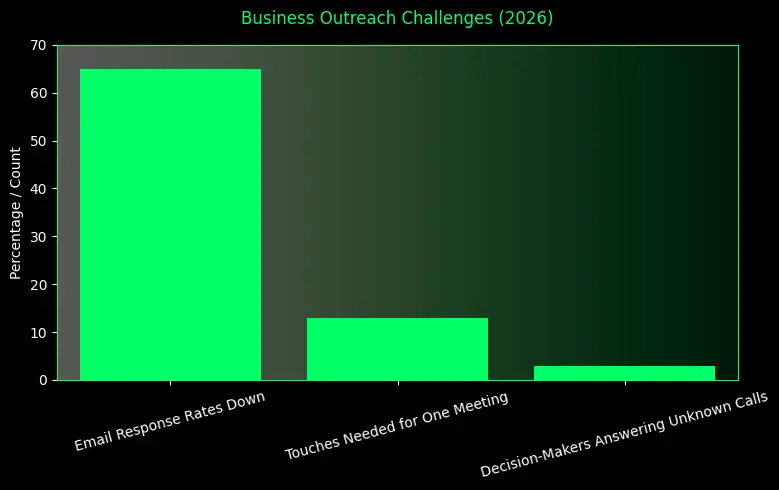
- Email response rates down 65% since 2022
- Takes 12-14 touches to book one meeting now
- Only 3% of decision-makers answer unknown calls
Most teams try to fix the problem by just doing more. They send more emails, make more calls, and add more people to the team. But that’s like walking faster with a broken compass. You just get lost quicker.
The real problem is You’re reaching out to people who aren’t ready. While you’re doing that, smarter teams found a better way.
What Winning Teams Figured Out
They stopped chasing people who were not interested. Instead, they focused on people who were already looking for a solution and reached them at the right time.
When you buy something important, you don’t decide on the first day. You research, visit websites, read reviews and compare options before talking to sales.
AI helps businesses notice these buying signals, like someone checking pricing pages or researching similar products. This information is not private. It is based on normal online behavior, and teams that care about data safety usually stick to privacy focused ai tools when tracking these signals.
So instead of contacting 100 random companies, teams focus on the few that are already interested. That is how AI makes business development smarter and more effective.
What AI Actually Does (No Hype)
Let’s be clear. artificial intelligence will not do your job for you and it is not magic.
What AI actually does is help with the heavy lifting. It spots patterns you would probably miss, like a company visiting your pricing page several times or researching how to switch from a competitor. You could track this yourself, but it would take too much time. AI does it instantly.
AI also helps you focus on the right leads. Not every lead is worth your energy. By looking at patterns from your past successful deals, AI highlights new prospects that look similar, so you know where to focus.
It takes care of repetitive tasks too, like updating the CRM, writing meeting notes, scheduling follow-ups, and doing basic company research. These things take hours for people but only seconds for AI.
AI also helps prevent missed opportunities. It tracks your deals, notices when conversations slow down and reminds you to follow up before a deal is lost.
But there are things AI cannot do. It cannot build real relationships, understand emotions, handle complex situations, or earn someone’s trust. That human part is still your responsibility, and it is the most important part of business development.
Before and After: Real Difference
Let me show you what changes.
The Old Way (Without AI)
The Old Way of Working Without AI
Monday morning. You’ve got 200 target companies from a purchased database. You start researching. Check websites. Scan LinkedIn. Try to find decision-makers. Build context. Two hours later, you’ve researched 20 companies. You write personalized emails. Five minutes each because you’re trying to customize them. By day’s end, you sent 50 emails. Feels productive. Friday: Two replies. One says “not now, try in six months.” The other ghosts after one question. Zero meetings booked. Thirty hours invested.
The New Way (With AI)
The New Way of Working with AI
Monday morning. You open your workspace. AI already scanned thousands of companies. Shows you 18 with actual buying behavior:
- Multiple website visits
- Downloaded your competitor guide
- Posted relevant job openings
- Recent funding or expansion news
For each one, you see decision-makers, company context, tech stack and why they were flagged.
You spend 30 minutes reviewing and use AI to draft emails from specific signals. You edit each one to sound human, adding observations and adjusting tone. You send 18 emails. Not 50. Friday: seven replies. Five from decision-makers. Three meetings. Six hours invested. Three real opportunities. Same person. Same skills. Better focus.
Four Ways Teams Use AI (What Actually Works)
1. Finding People Already Looking
The biggest shift is this: Stop interrupting. Start finding people already researching.
Buying signals AI tracks:
- Repeated pricing page visits (serious evaluation, not browsing)
- Downloaded guides or case studies (building a business case)
- Posted jobs for roles using your product (scaling that function)
- Adopted complementary tech (building an ecosystem)
- Got funding, hired executives, announced expansion (change moments)
You can’t track this manually. AI does it automatically.
The cost ranges from $100 per month for basic plans to $2,000 per month for mid-market options and goes up to $10,000 per month for enterprise.
The critical rule is that signals decay fast, so if someone visits your pricing page today and you wait three days, they’ve already moved on, which means you need a 24–48 hour response process or you shouldn’t buy the data at all.
2. Writing Messages That Sound Human
AI drafts outreach. But here’s what most people get wrong: You can’t just send what it gives you.
AI helps you past the blank page. Pulls context. Creates a starting point. But it always sounds a bit off. Too formal. Too generic. Your job is to make it conversational.
AI draft:
“I noticed your company recently expanded its marketing team. Many organizations experience collaboration challenges during periods of growth. I’d like to show you how our platform addresses these issues.”
Human edit:
“Hey saw you just brought on three content people. Congrats on the growth. That’s usually right when everyone starts losing track of who’s working on what. Worth a quick chat about what we’ve seen work?”
Same message. One sounds like a template. The other sounds like a person paying attention.
Tools cost between $50 and $300 per month, or you can just use ChatGPT for $20. The rule is that AI drafts, you fix it and then you send it.
3. Never Losing Track of Deals
How many deals died not because the prospect wasn’t interested, but because everyone got busy and forgot?
Happens constantly. Deal’s progressing nicely. Prospect goes quiet for two weeks. You’re busy. A month passes. By the time you follow up, they bought elsewhere or their budget disappeared.
AI-powered CRMs prevent this:
- Auto-summarize every conversation
- Track commitments and action items
- Flag deals with no activity
- Warn about missing information
Real example:
AI alerts you that a TechCo deal has been inactive for 14 days and the CFO wasn’t added, signaling a risk. You reach out: “Just checking in. Were you able to connect with your CFO? Happy to join the conversation.” The prospect replies: “Perfect timing, he’s asking about implementation. Can you call on Friday?” Without the alert, the deal might have quietly died. This feature typically costs 75 to 200 dollars per user per month and is often included in higher-tier CRMs.
4. Getting Your Time Back
Some business development tasks need your expertise, while others just need time and attention, like updating the CRM after calls, transcribing notes, scheduling meetings, researching backgrounds, pulling reports, and enriching data and none of these require you specifically because they just need to get done, so AI can handle all of it, which is why most teams save 10 to 15 hours per person each week, freeing up 20 to 30 percent of the work week for actual selling, and the cost is usually 10 to 100 dollars per month for automation tools.Some teams even use visual AI tools like Grok AI image and animation to speed up sales decks, demos and explainer visuals without pulling designers into every small request.
Your 30-Day Quick Start Plan
Don’t try everything at once. That’s where teams fail. Do this instead:
Week 1: Find Your Biggest Problem
Identify the biggest time drain or process gap by asking your team what wastes the most time, where leads fall through the cracks, and what tasks do not really need your expertise, then choose just one issue, such as slow research, weak outreach, deals going quiet, or heavy admin work.
Week 2: Test a Solution
Test two or three tools that directly solve that one problem. If you’re not sure where to start, a short list of top ai tools can save you hours of research. Use them for real work instead of demos, involve a small group with mixed skill levels and track time saved, performance changes, and whether the tool is genuinely useful.
Week 3: Measure the Difference
Measure results by comparing the pilot group with the rest of the team, looking at hours saved, work quality, meetings booked, deal speed, response rates, and overall return based on time value versus tool cost.
Week 4: Decide Next Step
Make a decision based on evidence by rolling the tool out if it clearly works, adjusting and retesting if results are mixed, or trying a different tool or problem if it fails, while staying honest about what actually improved.
Real Team Success Story
A mid-sized B2B software company with eight Business Development reps was struggling with low response rates and wasted research time.
They tested a $400/month intent data platform with three people for 60 days, using a simple workflow: check signals daily, prioritize warm accounts, let AI research, edit messages manually, and send.
After 90 days, research time dropped 55% (10–12 → 5 hours/week), reply rates nearly tripled (1.3% → 3.8%), and meetings booked rose 32%.
With $6,400/month saved versus a $400/month cost, the ROI was 16:1.
They succeeded by focusing on one problem, testing first, building a process around the tool, and measuring real results.
Mistakes That Kill This
I’ve seen teams waste money on AI. Here’s what goes wrong:
Mistake 1: Automating Broken Processes
Your outreach gets 1% response. You use AI to send 10x more of the same messages. Now you’re annoying 10x more people. AI amplifies what you’re doing. If it doesn’t work, AI helps you fail faster at larger scale.
Fix: Optimize your process first. Then scale what works.
Mistake 2: Trusting Scores Without Thinking
AI says lead is “high priority.” The rep spends three hours chasing them. Turns out they’re completely wrong for your product. AI went off surface signals that didn’t tell the full story.
Fix: Teach your team to question AI. If something doesn’t make sense, investigate before wasting time.
Mistake 3: Tools Without Process
You buy intent data showing buying signals. But you don’t have a process for who responds to alerts or how fast. Alerts pile up. Signals go stale. You’re paying for unused information.
Fix: Build the workflow first. Then buy the tool.
Mistake 4: Too Much at Once
You get excited. Buy tools for intent data, outreach, CRM intelligence, and scheduling all at once.
Your team has four new systems to learn. They master none. Three months later, nobody’s really using any properly.
Fix: One tool at a time. Master it. Build it into a routine. Then add the next one.
What AI Can’t Do (The Limits Matter)
Example: AI operates on code, not hunger or emotions.
AI is great at processing data. Spotting patterns across thousands of data points. Working 24/7. Perfect memory.
AI is terrible at what actually closes deals:
Can’t build trust with skeptical buyers. Can’t read the room during stakeholder tension. Can’t navigate company politics. Can’t adjust when conversations go in unexpected directions. Can’t show genuine empathy. Can’t make ethical judgment calls in gray areas.
Those need human intelligence, experience, and emotional awareness.
Winning teams understand this clearly:
Use AI for what it’s good at: finding signals, processing information, and handling repetitive tasks. Use humans for what humans are good at building relationships, reading context, making judgment calls and closing deals.
AI finds the opportunity. You close it.
Questions Everyone Asks
“Isn’t this expensive?”
It can be. Doesn’t have to be.
Enterprise tools cost thousands monthly. But you can start much smaller.
ChatGPT Plus: $20/month for research and drafting. Contact finders: $50-100/month. Meeting transcription: $10-30/month.
Get started under $100/month total.
Real question: What are you already spending on wasted time?
If your team spends 10 hours weekly on tasks that could be automated, and you pay them $50/hour fully loaded, you’re already spending $26,000/year per person on inefficiency.
Compared to that, a few hundred or even a few thousand monthly on tools getting that time back is cheap.
“Will my team actually use it?”
Only if you do this right.
Teams resist when tools don’t solve real problems or when tools are forced without their input.
How to get adoption:
- Get the team involved in choosing what to test
- Ask them what frustrates them most
- Let them test options and vote
- Provide real training, not just documentation
- Celebrate wins publicly when someone uses tools well
- Be honest about what’s working and what’s not
Our data is messy. Should we wait?
No. Start anyway. Many AI tools include data enrichment. They clean your data as you go.
Start with new leads. Build good habits there. Gradually clean historical data. Set aside two hours weekly for it. Waiting for perfect data means never starting. Your data will never be perfect.
“Will this replace Business Development jobs?”
It replaces tasks, not jobs. Email didn’t replace business development. It replaced letters and certain phone calls. BD professionals adapted. The role evolved.
Same thing here.
What changes:
- Less time on manual research
- Less time on data entry and admin
- Less time cold calling uninterested people
What increases:
- More quality conversations with ready buyers
- More relationship building
- More strategy work
The best Business Development people are becoming more valuable, not less. Because they focus on high-leverage activities AI can’t do.
What to Do This Week
Don’t just read this and move on. Pick one action.
If you’re a rep:
Sign up for ChatGPT Plus for $20. Use it to research your next five accounts. Track time saved versus your normal process. If it helps, keep using it. If not, you’re only out $20.
If you’re a manager:
Ask your team what wastes the most time. Not what you think. What they actually say. Write down the top three answers. Pick one. Research tools that solve that problem. Set up trials next week.
If you’re a Vice President:
Calculate your current inefficiency cost.
Monthly waste cost = hours wasted per rep per week × team size × hourly cost including overhead × 4.
Compare that to the tool costs of $200 to $2,000 per month. If the gap is five times or more, run a 60 day pilot. Start small. Measure real results. Scale what works.
Here are the top five FAQs for 2026 delivered in a quick human tone without the extra punctuation.
FAQ’s
1. How do I stop my outreach from sounding like a robot
In 2026, perfection is the enemy. To stand out, you have to use AI for the data but keep a human for the voice. The best outreach right now intentionally includes human elements like a reference to a shared local sports team that an AI wouldn’t prioritize.
2. Is human in the loop just a fancy way of saying humans still do the work
Not exactly. It means the AI does 90 percent of the digging but a human provides the final 10 percent of the soul. You use AI to find the lead and draft the angle then a human hits send only after ensuring the tone isn’t creepy.
3. Does AI make B2B relationships less personal
Actually, it is making them more personal. Because AI handles the scheduling and data entry, reps have more time for face-to-face meetings. In 2026, if you aren’t talking to your prospects more than you did two years ago, you are doing it wrong.
4. What is the biggest AI fail companies are making right now
Over automation. Companies that let AI handle the entire funnel from hello to close are seeing their brand reputation tank. Prospects in 2026 have sensors for this. They can smell a fully automated sequence a mile away and they find it lazy.
5. Do I need to be a coder to do BD in 2026
No, but you need to be a prompt pilot. You don’t need to write code but you do need to know how to talk to the machine to get the specific insights you need. The most valuable skill today isn’t selling but orchestrating the tools that help you sell.
Simple Way to Remember
A business grows when it improves:
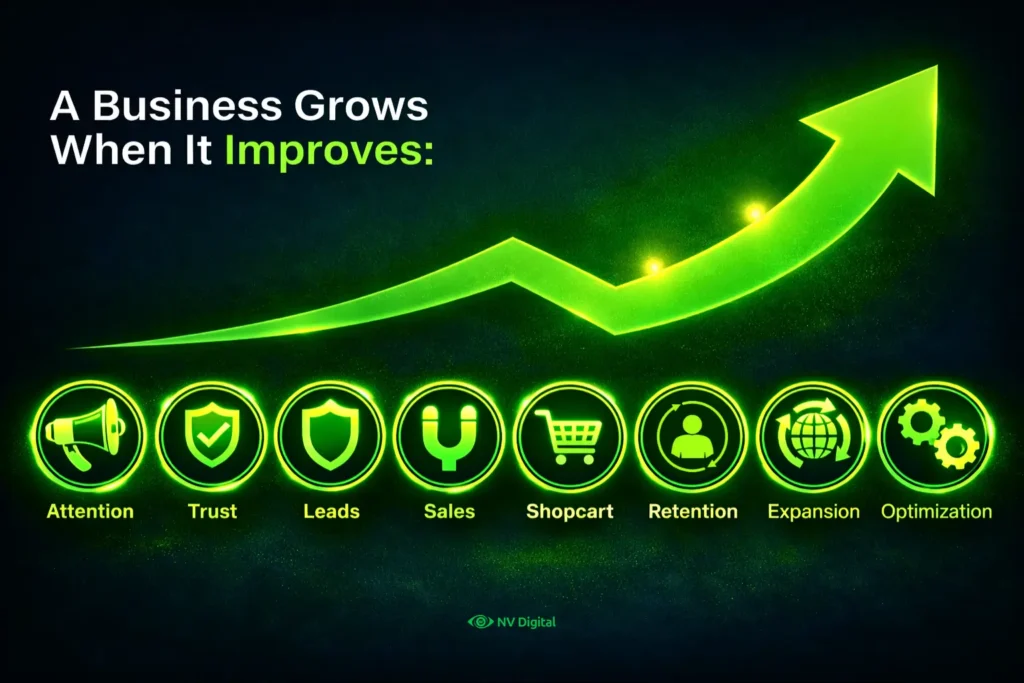
Attention → Trust → Leads → Sales →Shopcart → Retention → Expansion → Optimization
The Bottom Line
AI is not changing business development because it is smarter than people, but because it removes friction. It makes it easier to find the right prospects, research faster, keep track of details and prioritize what matters. When that friction disappears, teams can focus on what actually drives results: conversations, relationships, strategy and closing deals.
The teams winning in 2026 are not using more AI; they are using it better. They have not replaced judgment; they have improved information. Business development fundamentals have not changed: understand needs, build trust, show up at the right moment and help people decide. AI just helps teams do those fundamentals well at scale.
The real question is not whether to use AI, but whether it makes you better or worse at the basics. Most teams will automate broken processes and see little improvement. The teams that win will fix fundamentals first, then use AI to scale what already works.

0 Comments