

Most people build a website once, launch it and think the job is done. But during New Year or festival sales, when online traffic is high and money is on the table, if your website isn’t maintained properly, customers won’t wait for you.
Slow loading, broken pages, outdated content – one small issue is enough. They’ll close your site and move straight to your competitor.
Ignore your website for a few months and two things happen
- customers forget you and
- search engines stop showing you.
Websites aren’t “set it and forget it” assets. They’re living things in a digital world.
Take care of them regularly or they quietly disappear.
Think of your website like your car. Skip regular servicing and one day it’ll stop working usually when you need it the most.
If you don’t maintain your car, it will break down at the worst possible time
Many people confuse website redesign with website maintenance, but both are completely different. Check this blog, we’ve clearly explained the difference between website maintenance vs redesign in a simple and easy-to-understand way.
Before maintaining your website, you need a website maintenance checklist. This blog explains what it is, why it matters, what happens if you skip it, its pros and cons and how to use it step by step.
Table of Contents
Quick Table for Website Maintenance Checklist (Simple & Practical)
| Frequency | Time Needed | What to Check | What You Should Do | Tools (Optional) | Why It Matters |
|---|---|---|---|---|---|
| Daily | 3–5 mins | Security & Availability | Check if site is live, watch for downtime alerts, do a quick visual check, confirm backup exists | UptimeRobot, hosting alerts, Cloudflare | Catch issues before visitors notice |
| Weekly | 15–30 mins | Site Health | Run security scan, test forms, check error logs, fix broken pages, update plugins & themes | GSC, GA4, Semrush,Ubersuggest, ahref | Prevent data loss and broken functionality |
| Bi-Weekly | 15 mins | Links & Content | Find and fix broken internal and external links | Broken Link Checker(Plugin), Ahrefs Broken Link Checker | Protect SEO and user trust |
| Monthly | 1–2 hrs | Performance & SEO | Update CMS, take full backup, test site speed, optimize images, check Core Web Vitals, review analytics & users, verify SSL & domain | PageSpeed Insights, WP Rocket (WordPress), GSC | Keep site fast, secure, and ranking |
| Quarterly | 2–3 hrs | UX & Security | Full security review, performance deep dive, cross-browser testing, mobile UX check, accessibility review, content cleanup | Browser testing tools, WAVE, GA4 | Improve usability and stay updated |
| Yearly | Half day | Strategy & Compliance | Renew domain & SSL, full content and design review, legal pages check, accessibility & compliance audit | Manual + audit tools | Long-term stability and growth |
What is a Website Maintenance Checklist?
A website maintenance checklist is a clear list of tasks that keep your website secure, fast and working properly. These tasks are done on a regular schedule daily, weekly, monthly or quarterly.
Instead of guessing what to check, the checklist tells you exactly what to do: verify backups, update plugins, scan for security issues, test forms, and review performance. This prevents small issues from turning into major problems.
Every website doesn’t need the same checklist. An e-commerce site has different needs than a blog or business site. But the goal is the same, regular checks that keep the site stable and reliable.
Why Website Maintenance Checklist is Very Important?
Many businesses find out too late that skipping website maintenance is expensive.It leads to downtime, security issues, lost traffic and lost sales.
Security is the biggest reason.

Hackers look for outdated websites with security gaps. They don’t target people. They target weak sites using automated tools. Any outdated part of a website, whether it’s the platform, code, plugins, server setup or third-party tools, can become an easy entry point, like leaving your door unlocked. A website maintenance checklist helps keep everything updated and reduces these risks.
Your search rankings depend on it.

Google rewards fast, secure, mobile-friendly websites. If your site slows down because of bloated databases or unoptimized images, your rankings drop. When security certificates expire or malware gets in, Google flags or removes you from search results entirely. Regular maintenance keeps you visible where customers are looking for you.
User experience breaks without maintenance.

Broken forms lead to lost leads. Slow loading pages drive visitors away. Outdated content makes your business look unprofessional or inactive. Every broken element pushes potential customers to choose someone else.
Downtime costs money directly.

If your site crashes, you’re closed for business. No sales, no leads, no information for customers trying to find you. A study found that website downtime costs small businesses an average of $427 per minute. Even an hour of unexpected downtime is over $25,000. Regular checks catch issues before they cause crashes.
Small problems become big expenses.
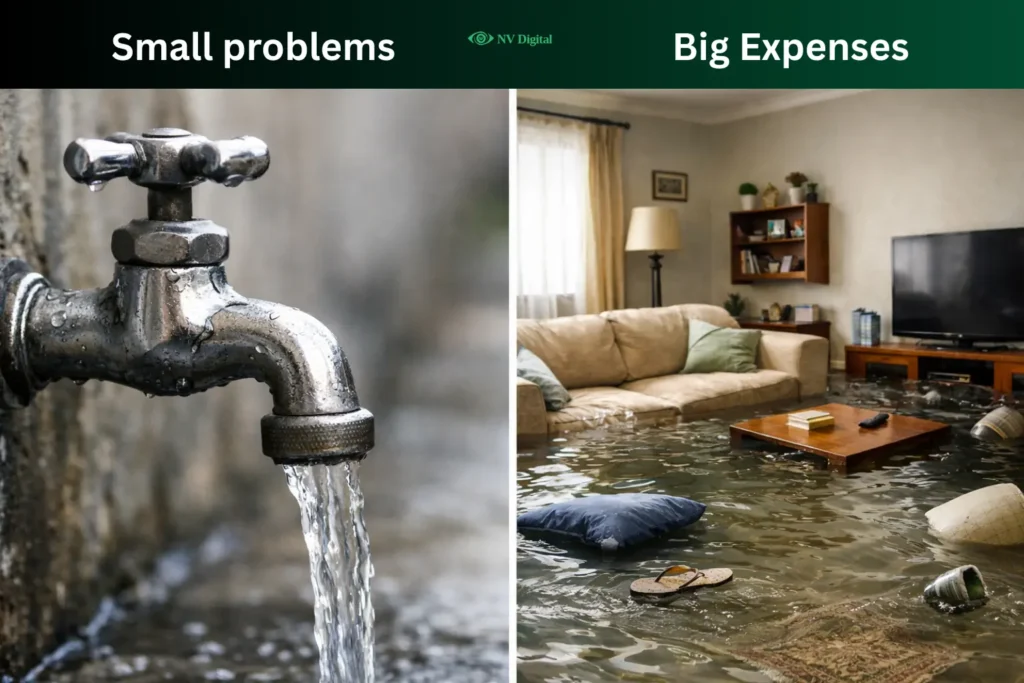
A small plugin issue that takes minutes to fix today can turn into a major site problem later. A missed security update can lead to data loss or a full site rebuild that costs a lot more. Regular maintenance prevents these problems before they grow.
A checklist matters because people forget things. When work gets busy, tasks get skipped. A checklist removes guesswork and makes sure maintenance is done consistently.
If your website loads too slowly, you lose your audience
How to Prepare a Website Maintenance Checklist
Start by understanding what kind of website you’re running. A simple small business site doesn’t need the same maintenance as a large ecommerce store. But some basics apply to every website. Security checks, backups, software updates and performance monitoring are mandatory, no matter the site size.
Next, list every part of your website that needs upkeep. This includes the platform, plugins, themes, custom code, forms, payment systems and any third party tools. Each item should have a specific maintenance task attached to it. Also include industry or legal requirements such as payment security standards, data protection rules or accessibility compliance.
Create realistic schedules you can actually follow. Weekly tasks done consistently are far better than daily checks that get skipped. Organize your checklist into daily, weekly, monthly, quarterly and yearly tasks to keep things manageable. Clearly assign responsibility for each task and document how important tasks should be done, not just what needs to be done.
Automate wherever possible. Use tools for backups, uptime monitoring and security scans. Regularly review these tools to make sure they are working properly and have not failed without notice.
How to Use a Website Maintenance Checklist Effectively
- A checklist is useless if you don’t follow it. Schedule website maintenance like any other important work and stick to that time.
- Set reminders that you actually pay attention to. Use a calendar, task app or notes. The goal is to make sure the task gets done.
- Always follow the checklist step by step. Take a backup first, then make updates and test the site after. This order prevents mistakes.
- Tick off tasks when they’re done and keep short notes. Write down what you checked, what change and any issues you found. This helps if something breaks later.
- Never assume your website is fine. Test forms, page speed, and mobile views regularly. Some problems only show up for users, not for you.
- Update the checklist as you learn. If something needs to be checked more often, add it. If a task isn’t useful, remove it.
- Do similar tasks together to save time, like updating everything at once or testing everything in one go.
- Test big changes on a staging or test site before making them live. This avoids breaking your website in front of visitors.
- Keep a list of issues that are not urgent and fix them during monthly checks.
- Finally, be prepared for emergencies. Know how to restore backups, where your login details are stored, and who to contact if your site goes down.
What Actually Goes Wrong When You Do Website Maintenance Without a Checklist
You forget critical updates
Without a checklist, updates depend on memory. Plugins, themes, or server components get skipped. Those missed updates often contain security patches. That’s how sites get hacked, not by effort, but by neglect.
Small issues pile up
A slow page, a broken form, a warning email you meant to fix later. Each one feels minor, so it gets postponed. Over time, these “small” issues stack up and turn into downtime, lost leads, or a full site rebuild.
Performance degrades gradually
Databases grow, images stay unoptimized, unused plugins remain active. The site gets slower week by week. Visitors feel it before you do and many leave without telling you why.
You break things without realizing
Manual changes without a checklist often skip steps like backups or testing. One small tweak can break layouts, payments or tracking. You may not notice for days, sometimes weeks.
Problems are found too late
Without regular, structured checks, you only find problems when a customer complains or sales drop. At that point, the fix is urgent, stressful, and expensive.
Maintenance becomes inconsistent
When work gets busy, maintenance is the first thing skipped. A checklist removes decision-making. Without it, maintenance depends on mood, time, and memory and that’s unreliable.
Note: Website maintenance without a checklist isn’t faster. It just delays problems until they’re harder and costlier to fix.
Website Maintenance Checklist – Pros vs Cons
| Advantages | Disadvantages |
|---|---|
| Keeps the site fast, stable, and reliable for visitors | Requires regular time and attention |
| Catches security issues before hackers exploit them | Initial checklist setup takes effort |
| Prevents plugin conflicts and site crashes | Some tasks need technical knowledge |
| Improves Google rankings through speed, security, and updates | Outsourcing maintenance adds recurring cost |
| Costs far less than emergency repairs or rebuilds | Poor execution can create a false sense of safety |
| Protects data with regular backups and recovery options | Only works if done consistently |
| Delivers smoother user experience and working forms | Can uncover problems that feel overwhelming |
| Helps meet security, privacy, and accessibility standards | Checklist itself needs updates over time |
| Reduces stress by keeping the site monitored and protected | Generic checklists may miss site-specific needs |
| Extends the life of the website | Over-maintenance can distract from growth |
| Keeps you ahead of competitors with neglected sites | Discipline is required to stick with it |
| Saves time by replacing guesswork with a process | Not ideal for owners who want zero involvement |
| Creates clear records and accountability | Can feel like “extra work” at first |
| Scales easily as the site grows | Balance is needed to avoid busywork |
Frequently Asked Questions
Q: I’m not technical. Can I still handle website maintenance?
A: Yes. Many tasks are simple and use built-in tools or automation, like backups and security scans. For anything technical, hiring a professional on a small monthly plan is often enough and saves stress.
Q: How much does website maintenance usually cost?
A: It depends. Doing it yourself may cost $20–$50 per month for tools. Hiring a professional typically costs $50–$500+ per month based on site size and complexity. That’s usually far less than the cost of fixing a hacked or broken site.
Q: My site is on Wix or Squarespace. Do I still need maintenance?
A: Yes, but it’s lighter. The platform handles updates and security, but you still need to review content, test forms, fix broken links, and monitor traffic to keep the site effective.
Conclusion
A website maintenance checklist isn’t about fearing what could go wrong. It’s about confidently knowing what’s right.
It transforms your website from a static digital brochure into a reliable, high-performing business asset that works for you 24/7. By dedicating small, scheduled moments of care, you protect your investment, build trust with every visitor, and free yourself to focus on what you do best running your business.
Start this week. Choose one task from your weekly checklist, set up that automated backup if you have not done it yet, and complete it. You will be glad you did.


0 Comments